Tender
A naira note identifier for blind and low-vision Nigerians. Native Swift, iOS only, by decision.
- Swift 6
- SwiftUI
- Core ML
- AVFoundation
- Core Haptics
- App Intents
- XCUITest
The problem
Naira notes have no tactile marking. None of the eight denominations can be told apart by touch, and since the 2022 redesign there are eleven visually distinct notes carrying those eight values. A blind Nigerian handling cash is trusting the other party, every time — the bus conductor, the trader, the person handing back change.
Every currency reader on the market — Seeing AI, Lookout, the rest — covers the dollar, euro, pound, rupee and yen. None covers the currency of Africa’s largest economy.
What I built
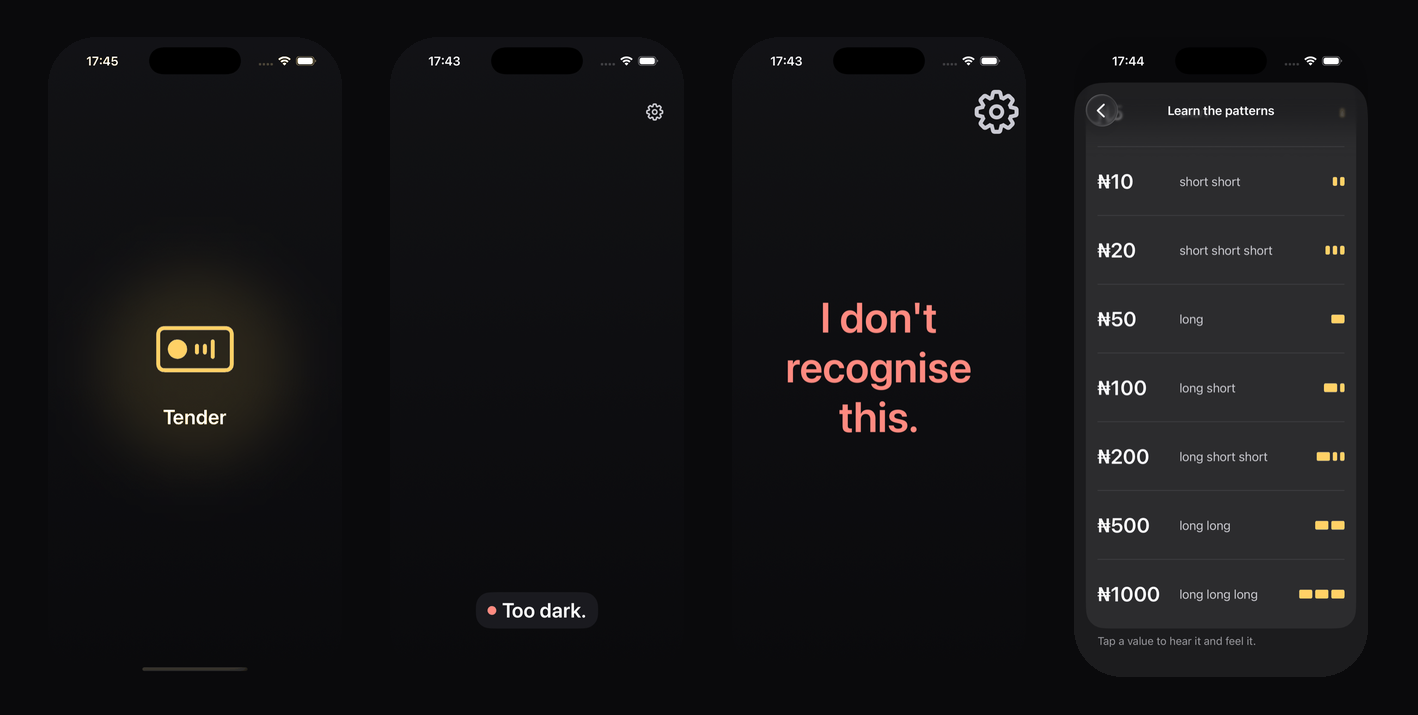
- Point, hear, feel. The camera opens on launch; the app says whether it can see a note — too dark, closer, hold steady — then names it through VoiceOver and pulses it through the haptic engine in a pattern different for every value, so the answer lands in a market too loud to hear a phone.
- Native, for a reason written down first. The user never looks at the screen, so the accessibility layer is not a feature of the interface — it is the interface — and VoiceOver’s rotor, interrupting announcements and Core Haptics are the platform’s own. This is the one native project in a portfolio of cross-platform ones, and ADR-0001 is the case.
- A domain that imports nothing. Not Foundation. The confidence gate, frame judging, a two-frame agreement rule, the haptic vocabulary and the arithmetic behind a tally and a change checker live in a Swift package that tests in two milliseconds at 99% coverage.
- Twenty more things, each checked against five rules before it was built: nothing requires sight, nothing is stored or sent, never authenticity, never money movement, native for a reason. The torch in the dark; How sure?; a quiz; a change checker for the conductor problem; Siri and the Action button; the denomination in Naijá, Hausa, Yorùbá, Igbo or Fulfulde from bundled clips.
Decisions worth naming
- It names the denomination, never the authenticity. An image classifier learns colour, layout and the portrait — exactly what a counterfeit copies first. No sentence in the app says or implies a note is genuine, and a word-list gate fails the build on the words that would. The most-requested feature, refused permanently, with the reason where the request will be made.
- The placeholder announces itself. Until the model is trained, the classifier recognises nothing and says “I don’t recognise this” to everything — because a stand-in that returned a plausible denomination would be indistinguishable from the product to anybody not reading its source, and would put a wrong number in front of a blind person holding cash.
- A language the app cannot say is not offered. Sixty bundled clips, every one a placeholder that says so in English; the language list reads the same placeholder list the build gate counts and offers only languages with none in it. Hausa appears the day its twelve clips come back from a speaker.
- Every gate is broken on purpose before it is trusted. Twelve of them. The accessibility audit found two real defects on its first run; a dark fixture found that the judge said “I can’t see a note” in the dark, sending a blind user checking their grip when the problem was the light.
What is not finished
- The classifier. Eleven classes, a week of photographing banknotes under four kinds of light — the one gate in this portfolio that waits on nobody but me. The dataset tools, the training script and the gate that refuses a model below 95% on any class are built and proved on synthetic data.
- A handset. A simulator has no camera. The live pipeline, the torch and the two-second budget have never met a real note in a real hand; the tests that will run on a phone are written and skip by name until one is plugged in.
- Blind users. Five notes in under a minute, unassisted, and whether long short and long short short are distinguishable through a pocket on a bus. Every accessibility decision so far was made by a sighted person reading Apple’s guidelines, which is a starting point and not a result.